 coffer
Guide
Installation, first vault and the full command overview.
coffer puts an encrypted, growable container into a single file and
mounts it as an ordinary directory - as a normal user, no root, no sudo.
Inside, cp, mv, rsync, editors and file managers all just work.
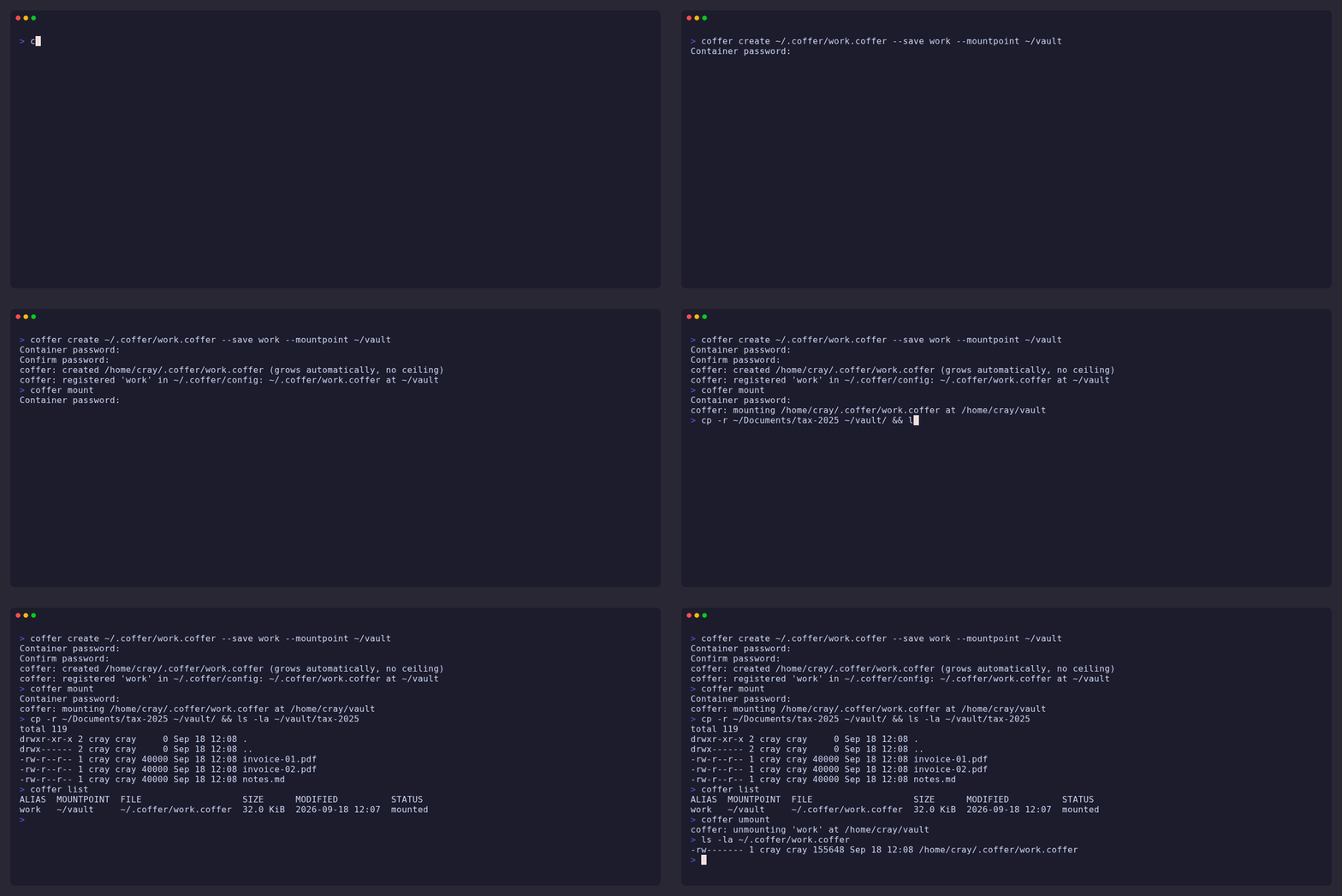
coffer create vault.coffer
coffer mount  vault.coffer ~/vault
cp -r ~/Documents/secret-stuff ~/vault/
coffer umount ~/vault
The container is a SQLCipher database
(AES-256-CBC per page, HMAC-SHA512, PBKDF2 key derivation), mounted through
FUSE. It has no fixed size and no resize step - the file simply grows as
you write - and it survives a crash or kill -9 mid-write thanks to
SQLite's write-ahead log. Linux only; one user mounts a given container at
a time.
The full design rationale, operational details and packaging notes live in REFERENCE.md.
Installation
Debian / Ubuntu
Prebuilt .deb packages for Debian 12/13 and Ubuntu 24.04/26.04, each for
amd64 and arm64, are on the
Releases page. Take the one
built for your distro and architecture:
sudo apt-get install ./coffer_*_<debian12|debian13|ubuntu2404|ubuntu2604>_<amd64|arm64>.deb
Raspberry Pi OS (64-bit) is Debian underneath: Bookworm takes the
debian12_arm64 package, Trixie the debian13_arm64 one.
Fedora / Enterprise Linux / openSUSE
Prebuilt .rpm packages for Fedora 43/44, EL9/EL10 (RHEL, AlmaLinux,
Rocky, Oracle), openSUSE Leap 16.0 and Tumbleweed, each for x86_64 and
aarch64, are on the same
Releases page. The distro
name in the file says which is which:
sudo dnf install ./coffer-*-1.<fedora43|fedora44|el9|el10>.<x86_64|aarch64>.rpm
sudo zypper install --allow-unsigned-rpm ./coffer-*-1.<leap160|tumbleweed>.<x86_64|aarch64>.rpm
Tumbleweed users should take the rolling
latest
prerelease, rebuilt on every push to main, rather than a tagged version.
Verifying a download
Every release ships SHA256SUMS and a minisign
signature over it, made with this key (also in minisign.pub):
RWQ+t65ZtqJCgWr+lzpOt84AQwlTWWeXkovMWjdwJM2+EFvmCrJwzB8R
minisign -Vm SHA256SUMS -P RWQ+t65ZtqJCgWr+lzpOt84AQwlTWWeXkovMWjdwJM2+EFvmCrJwzB8R
sha256sum -c SHA256SUMS --ignore-missing      # checks the package(s) you downloaded
Cargo
cargo install cofferfs # the crate is cofferfs, the binary is coffer
The crate name differs because coffer was taken on crates.io by an
unrelated library; what gets installed is still coffer. Needs a Rust
toolchain and the fuse3 package for the fusermount3 helper, and
compiles SQLCipher and OpenSSL from source, so the first build takes a
while. The prebuilt packages above are quicker.
From source
git clone https://github.com/rtulke/cofferFS.git
cd cofferFS
./setup.sh              # installs build deps (apt, dnf or zypper) + rustup, builds, offers to install
setup.sh handles Debian/Ubuntu/Raspberry Pi OS, Fedora/EL and openSUSE.
On anything else install fuse3 (for the fusermount3 helper), gcc,
make and perl, plus a current Rust toolchain via
rustup - the rustc shipped by most distros is too
old for this project's dependencies. No libfuse development package is
needed. Then:
make build              # release binary, man page, shell completions
sudo make install       # /usr/local - or: make install PREFIX=$HOME/.local
Quick start
Create a container, register it under the alias work, mount it:
coffer create ~/.coffer/work.coffer --save work --mountpoint ~/vault
coffer mount            # the one registered vault - prompts for the password
ls ~/vault
coffer umount
With a single registered vault, coffer mount and coffer umount need no
arguments at all. Two habits worth adopting from day one:
coffer add work ~/.coffer/work.coffer ~/vault --idle-timeout 30m   # auto-unmount when idle
coffer backup work ~/backups/work.coffer                            # consistent copy, safe while mounted
Detailed guide
Several vaults
Every vault gets an alias in ~/.coffer/config, either at creation
(--save), at mount time (coffer mount FILE DIR --save ALIAS) or
explicitly:
coffer add work   ~/.coffer/work.coffer   ~/vault        --idle-timeout 30m
coffer add photos /data/photos.coffer     /media/photos  --compact-on-idle 2h
coffer list
From then on the alias stands in for file and mountpoint everywhere:
coffer mount photos, coffer umount photos, coffer check photos,
coffer backup photos DEST. With several vaults registered, a bare
coffer mount or coffer umount shows a numbered menu (alias, mountpoint,
file, size, last modified, mounted or not) and asks which one. Options
given to coffer add become that alias's defaults; anything passed on the
command line still wins. --read-only (-r) mounts a container without
any chance of writing to it, for example a backup copy; stored with
coffer add --read-only, an archive vault is read-only on every mount.
--log FILE (-l) gives a daemonized mount a place to report idle
unmounts, auto-compaction and errors.
The file is plain INI, one section per vault, safe to edit by hand:
[work]
file = ~/.coffer/work.coffer
mountpoint = ~/vault
idle_timeout = 30m

[photos]
file = /data/photos.coffer
mountpoint = /media/photos
compact_on_idle = 2h
An alias is a bare word (letters, digits, -, _, .); anything with a
/ or a leading . or ~ is always treated as a path. $COFFER_CONFIG
points at a different registry file.
Scripts, cron and systemd
Every command that prompts for a password also accepts
--password-file FILE (first line is the password; keep the file 0600,
a wider mode prints a warning). Stored in the registry it becomes the
alias's default:
coffer add work ~/.coffer/work.coffer ~/vault --password-file ~/.coffer/work.pw
coffer mount work           # no prompt
Better than a plaintext file: --password-command CMD runs a shell
command and uses the first line of its output, so the password can live in
whatever secret store you already use:
| Store | --password-command |
|---|---|
| GNOME Keyring, KDE Wallet | secret-tool lookup coffer work |
| pass / gopass | pass show coffer/work / gopass show -o coffer/work |
| 1Password CLI | op read "op://Private/coffer work/password" |
| Bitwarden CLI | bw get password coffer-work |
| A graphical prompt | zenity --password --title=coffer |
| systemd unit | systemd-ask-password "coffer work:" |
coffer add work ~/.coffer/work.coffer ~/vault --password-command 'secret-tool lookup coffer work'
A systemd user unit mounts a vault at login and unmounts it at logout:
# ~/.config/systemd/user/coffer-work.service
[Unit]
Description=coffer vault "work"

[Service]
ExecStart=/usr/bin/coffer mount work --foreground --password-file %h/.coffer/work.pw
ExecStop=/usr/bin/coffer umount work

[Install]
WantedBy=default.target
systemctl --user enable --now coffer-work
--foreground keeps the mount process attached so systemd can supervise
it; without it coffer mount daemonizes and returns immediately.
Several users on one machine
Each user has their own registry, containers and mounts. A FUSE mount is
visible only to the user who created it, so a container mounted by one
user is invisible to everybody else - there is no shared-mount mode.
Sharing a container means handing over a copy: coffer backup produces a
consistent one at any time, even while the source is mounted (on a
network filesystem: from the machine it is mounted on).
A container can be mounted by exactly one process at a time; mount,
passwd and compact take an exclusive lock on the file and refuse to run
against a container that is in use, on this or (for a container on NFS)
any other host. Keep mountpoints in your own home directory rather than
/tmp - other users' desktop sessions watch every mount they can see
under /tmp and can keep it busy. If your home is on NFS with
root_squash, see the NFS section in REFERENCE.md before choosing a
location.
On a network filesystem (NFS, SMB, sshfs, ...) the mount holds its locks
for its whole lifetime instead of per operation (--locking, default
auto): per-operation locking costs a round trip to the server each time,
which made a mount on NFS some 50x slower once the server recalled the
file's delegation. While such a mount runs, coffer backup goes through it -
on the machine where it is mounted; from another host it is refused - and
check/info ask for an unmount. See Locking on network
filesystems in REFERENCE.md.
Maintenance
coffer info    work                 # files, directories, on-disk vs. logical size
coffer check   work                 # read-only integrity check (HMAC + structure)
coffer backup  work DEST            # consistent copy, safe while mounted
coffer passwd  work                 # change the password (container must be unmounted)
coffer compact work                 # reclaim space after large deletions (VACUUM, unmounted)
Deleted data frees space inside the container, but the file itself only
shrinks on compact - compare the two sizes in coffer info to see
whether it is worth running. --compact-on-idle DURATION on mount or
add does it automatically once the mount has been idle that long and
there is something meaningful to reclaim.
Command overview
| Command | What it does | Notable options |
|---|---|---|
create FILE |
Create a new container (password prompted twice) | --max-size 10G, --save ALIAS --mountpoint DIR, --password-file, --password-command |
mount [FILE\|ALIAS] [DIR] |
Mount as the current user; no argument = registered vault or menu | --save ALIAS, --idle-timeout, --compact-on-idle, --foreground, --password-file, --password-command, --read-only (-r), --log FILE (-l), --enforce-permissions, --locking auto\|exclusive\|normal |
umount [DIR\|ALIAS] |
Unmount; no argument = the mounted registered vault or menu | |
add ALIAS FILE DIR |
Register a vault in ~/.coffer/config |
--idle-timeout, --compact-on-idle, --password-file, --password-command, --log-file, --read-only, --enforce-permissions, --locking |
remove ALIAS |
Forget an alias (the file stays) | |
list |
Registered vaults and whether each is mounted | |
info FILE\|ALIAS |
Counts and sizes | --password-file, --password-command |
check FILE\|ALIAS |
Integrity check, read-only | --password-file, --password-command |
backup FILE\|ALIAS DEST |
Consistent copy via SQLite's online backup, with a progress bar on a terminal | --password-file, --password-command |
passwd FILE\|ALIAS |
Change the password | --password-file, --password-command, --new-password-file |
compact FILE\|ALIAS |
VACUUM, reclaims freed space | --password-file, --password-command |
completions SHELL |
Print bash/zsh/fish completions (they also complete the registered aliases) |
Durations take s, m, h, d suffixes (45s, 30m, 2h). Sizes take
K, M, G, T. coffer --version prints the version and the git
commit it was built from. The man page coffer(1) documents everything in
full.
Miscellaneous
- Crash safety. WAL journaling with
synchronous=NORMAL; every filesystem operation is one SQLite transaction. A hard kill mid-write loses at most the last unflushed write, never the container. - Integrity. SQLCipher HMACs every 4 KiB page; a wrong password fails
immediately instead of returning garbage.
coffer checkruns the cipher-level check, the structural one, and a consistency check of the filesystem itself: every name resolves, every file is reachable. - What is stored. Files, directories, symlinks, hard links,
permission bits, ownership, timestamps and extended attributes
(
user.*and the rest, up to 64 KiB per value like ext4), socp -a,rsync -aHXand desktop tagging round-trip. - Container format. Containers made by coffer 0.1.x use format 1,
which has no hard links. The first writable open by this version
upgrades such a container in place and prints a line saying so - one
transaction that rebuilds the inode table and leaves the file content
untouched, so it costs time in proportion to the number of files, not
to their size. "Writable" means
mount, and alsopasswdandcompact. The upgrade is one-way: afterwards coffer 0.1.x refuses the container with a clear message rather than misreading it, so take acoffer backupfirst if an older installation still has to open it.info,checkandbackupkeep working on a format-1 container and leave it alone; a read-only mount is refused, because it cannot do the upgrade. - Permission bits. Stored and reported faithfully, but not checked by
default: a file with mode
000still opens.--enforce-permissionshands the check to the kernel, which makeschmodinside the container mean what it says. It is off by default because it can lock you out of files restored from a backup (foreign owners) or of a container created under a different user id. It adds no secrecy: whoever has the password can mount the container themselves. - Limitations. One mounter at a time. Fine for documents and photos, not tuned for routinely storing many multi-GB files.
- Known upstream bug. SQLCipher's
cipher_integrity_checkmisreports pages past 4 GB in the version currently bundled;coffer checkdetects and works around that pattern. Details in REFERENCE.md. - Packaging.
packaging/build-deb.shandpackaging/build-rpm.shbuild every package natively in its distro's container;packaging/test-install.shinstalls and smoke-tests each one. The GitHub Actions workflow does the same on every push and publishes to Releases. - License. MIT.
Source of this page: README.md in the cofferFS repository.